In this article
Vulnerability summary
- CVE
- CVE-2026-79844, CVE-2026-79845, CVE-2026-79846, CVE-2026-79847, CVE-2026-79848, CVE-2026-79849, CVE-2026-79850, CVE-2026-79851
- Exploited?
- Not known to be exploited. HPE says it "is not aware of any public discussion or exploit code that targets the listed vulnerabilities" as of October 22. The bulletin covers 72 CVEs; the eight listed here are the ones HPE rates CVSS 10.0.
Who is affected and what fixes it
| Product | Affected | Fixed in | Source |
|---|---|---|---|
| AOS-10.8 (Mobility Gateways, AOS-10 access points) | 10.8.1.1 and below | 10.8.1.2 and above | HPE bulletin, checked |
| AOS-10.7 | 10.7.2.6 and below | 10.7.2.7 and above | HPE bulletin, checked |
| AOS-10.4 | 10.4.1.13 and below | 10.4.1.14 and above | HPE bulletin, checked |
| AOS-8.13 (Mobility Conductors and Controllers, AOS-8 Instant access points) | 8.13.3.0 and below | 8.13.3.1 and above | HPE bulletin, checked |
| AOS-8.10 | 8.10.0.23 and below | 8.10.0.24 and above | HPE bulletin, checked |
| Older AOS releases past End of Maintenance or End of Support | HPE says End of Maintenance versions "are presumed to be affected" and End of Support versions "should be considered potentially impacted" | No fix in this bulletin. Move to a supported release above | HPE bulletin, checked |
Patch checklist
- Find the AOS version on each Aruba controller, gateway and access point (the dashboard, HPE Networking Central, or
show versionon the CLI). - HPE's advice: upgrade to 10.8.1.2, 10.7.2.7, 10.4.1.14, 8.13.3.1 or 8.10.0.24 or later, matching your release line. Downloads are on the HPE Networking Support Portal.
- Our advice: update controllers, conductors and gateways first, then access points, in a maintenance window, and keep a copy of the current configuration.
- If you're on a release past End of Maintenance, plan the move to a supported release; HPE presumes those versions are affected and doesn't cover them.
If you can't update yet
- HPE's workaround: restrict the CLI and web management interfaces "to a dedicated layer 2 segment/VLAN and/or controlled by firewall policies at layer 3 and above", with accounting and logging of admin activity.
- Our advice: make sure no Aruba management interface or PAPI traffic (UDP port 8211, per the bulletin) is reachable from the internet or from guest Wi-Fi. This lowers the risk; it doesn't remove it, and several flaws only need access to the local network.
How to check for compromise
- Our advice: review the controller and gateway admin logs for logins, accounts or configuration changes you don't recognize, and change admin passwords if management interfaces were reachable from untrusted networks.
TL;DR: HPE has fixed 72 security flaws in the AOS-8 and AOS-10 operating systems that run HPE Aruba Networking wireless controllers, gateways and access points. Eight of them (CVE-2026-79844 to CVE-2026-79851) are rated the maximum CVSS score of 10.0 by HPE, and HPE says most of those let an attacker with no password run commands on the device. HPE says it knows of no attacks or public exploit code. The fixed releases are 10.8.1.2, 10.7.2.7, 10.4.1.14, 8.13.3.1 and 8.10.0.24, published October 22. If your office Wi-Fi runs on Aruba controllers or access points, check the version and schedule the update this week.
What happened
HPE Networking published security bulletin HPESBNW05162 on October 22, 2026, rated Critical. It covers the AOS-8 and AOS-10 wireless operating systems on Mobility Conductors, Mobility Controllers, Mobility Gateways managed by HPE Networking Central, AOS-10 access points and AOS-8 Instant access points. The bulletin lists 72 CVEs, which HPE says were “generally discovered by internal security research at HPE Networking.”
The eight flaws HPE rates CVSS 10.0 include authentication bypasses, command injection, SQL injection and buffer overflows. For several, HPE says a successful attack “could allow an attacker to execute arbitrary commands on the underlying operating system”; for the AOS-8 authentication bypass (CVE-2026-79850), commands run “as root on the underlying operating system leading to complete system compromise.” One AOS-10 flaw (CVE-2026-79845) gives an attacker administrative access rather than code execution, and HPE says CVE-2026-79844 needs “certain preconditions outside of the attacker’s control.” Many of the other flaws are in PAPI, which HPE describes as “Aruba’s access point management protocol,” on UDP port 8211; some of those need the attacker to be on the same network.
On exploitation, HPE says it “is not aware of any public discussion or exploit code that targets the listed vulnerabilities as of the release date of this advisory,” and adds: “Customers are strongly urged to patch their instances due to the complexity, breadth, and impact of these vulnerabilities.” SecurityWeek reported the bulletin on October 27.
Why it matters
A wireless controller or gateway sits in the middle of an office network, so a takeover gives an attacker a strong foothold for spying on traffic or moving to other machines. Network gear like this is a favourite target once fixes are public, because attackers can compare patched and unpatched versions to work out the bugs, and many small offices update their Wi-Fi equipment rarely. Nobody has reported attacks yet, which makes this the right time to update. HPE also says versions past End of Maintenance “are presumed to be affected” and aren’t covered, so older Aruba gear may have no fix at all. Our Security hub tracks other patches worth doing now.
What to do now
- Check what you run. Log in to your Aruba controller, Mobility Conductor, gateway or Instant access point (or HPE Networking Central if you use it) and note the AOS version. On the CLI,
show versionshows it. If someone else manages your Wi-Fi, ask them which AOS version you’re on and when they’ll update. - Update to a fixed release. HPE’s fixed versions are 10.8.1.2, 10.7.2.7, 10.4.1.14, 8.13.3.1 and 8.10.0.24, or later in the same line. Download them from the HPE Networking Support Portal. Our advice: back up the configuration first, update controllers and gateways before access points, and do it out of hours, as Wi-Fi will drop while devices restart.
- Lock down management access. HPE’s workaround is to restrict the CLI and web management interfaces “to a dedicated layer 2 segment/VLAN and/or controlled by firewall policies at layer 3 and above along with accounting controls for tracking and logging user activities and resource usage.” Our advice: make sure none of it is reachable from the internet or from guest Wi-Fi, even after you update.
- Plan for old hardware. If your devices run a release past End of Maintenance, HPE presumes they’re affected and isn’t covering them in this bulletin. Plan an upgrade to a supported release, or replacement if the hardware can’t run one.
- Check ClearPass too. The same day, HPE published a separate critical bulletin, HPESBNW05171, for ClearPass Policy Manager, covering the PHP2Shell flaws (CVE-2026-109618 and CVE-2026-109619). If you use ClearPass for Wi-Fi logins, follow that bulletin as well.
Updates
- Oct 27, 2026, 10:17 p.m. Manila: First published. HPE’s bulletin is at revision 1 (October 22). No exploitation reported at our check; we’ll add a dated note if that changes.
Sources & method
Sources
- HPE Networking security bulletin HPESBNW05162 rev. 1, signed text version (October 22, 2026)
- HPE Support Center, HPESBNW05162 bulletin page
- HPESBNW05162 in CSAF (machine-readable) format
- HPE Networking Support Portal (fixed software downloads)
- HPE Networking security bulletin HPESBNW05171 rev. 2, ClearPass Policy Manager and the PHP2Shell flaws (October 22, 2026, updated October 23)
- SecurityWeek, “HPE Patches Dozens of Critical Flaws in Networking Products” (October 27, 2026; secondary source)
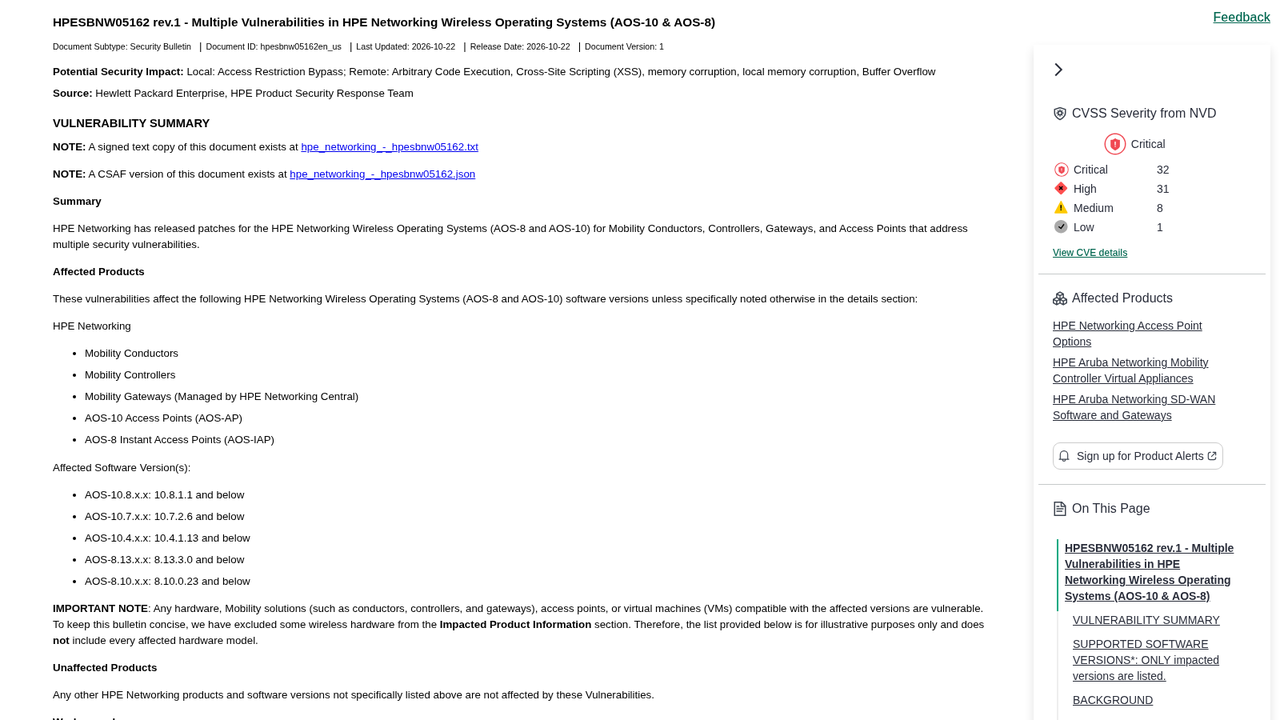
Method. Last checked October 27, 2026, at 10:17 p.m. Manila time (14:17 UTC). The affected and fixed versions, CVE details, CVSS scores, workaround, exploitation status and End of Maintenance note come from HPE’s bulletin HPESBNW05162, which we read in HPE’s signed text and CSAF versions and on the HPE Support Center. SecurityWeek is a secondary source only. The ClearPass details come from HPE’s separate bulletin HPESBNW05171. We don’t give a count of critical-rated flaws because the published tallies differ. Steps labelled “our advice”, the show version tip and the update order are our own advice, not HPE’s. The thumbnail is a screenshot of HPE’s bulletin page. No affiliate links on this page. How we work.
Spotted an error? See our corrections policy and tell us.